SnapPost - AI Poster Creator
SnapPost is a mobile application that leverages Gemini Flash image preview to help users create shareable social media posters.
Overview
SnapPost is a mobile application that simplifies photo sharing and enhances social interaction. It allows users to instantly capture photos, preview them, and select from various themes and captions to generate shareable posters. The app bridges the gap between simple photo capture and polished visual content creation, making it easy for anyone to produce professional-looking posters without graphic design skills.
How It Works
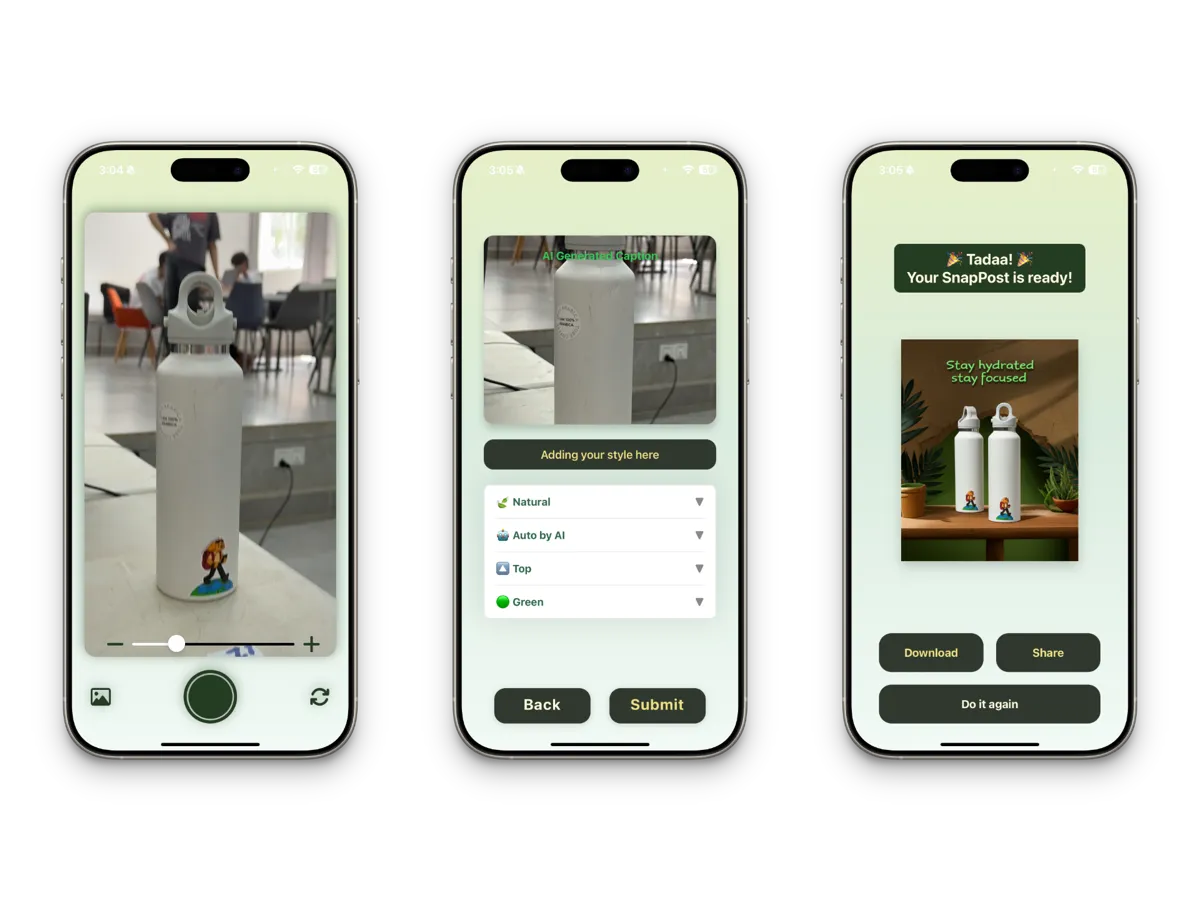
The poster generation flow combines device camera functionality with AI-powered content suggestions. When a user captures a photo, the image is sent to Google's Gemini Flash model for analysis. The AI examines the image content and generates relevant caption suggestions and theme recommendations that match the mood and subject of the photo. Users can then choose from these AI-generated options or customize them before the app composites the final poster layout. The poster combines the original photo with the selected theme template, caption text, and optional decorative elements into a single shareable image. The entire process takes just a few seconds from capture to a finished poster ready for social media.
Key Features
- Instant photo capture with Gemini Flash image preview and AI-powered analysis
- AI-generated theme and caption suggestions based on photo content
- One-tap sharing to social media platforms including Instagram, Facebook, and Twitter
- Customizable privacy settings for controlling who can see your posts
- Real-time feed and notifications to stay updated on community activity
- Modern, intuitive UI built with React Native for smooth cross-platform performance
- Multiple poster templates with different layouts, fonts, and color schemes
Tech Stack
- Expo
- React Native
- TypeScript
- Google Gen AI SDK
How to Use
- Open the app and sign in or create an account.
- Tap the camera button to capture a new photo or select one from your gallery.
- Wait for the AI to analyze your image and suggest themes and captions.
- Browse the suggested options and select a theme that fits your style.
- Customize the caption text if you want to personalize the message.
- Preview the final poster layout and make any last adjustments.
- Share your poster directly to social media or save it to your device.
Design Philosophy
SnapPost was designed with the principle that creative tools should feel effortless. The interface prioritizes a minimal number of taps between opening the app and sharing a finished poster. Rather than overwhelming users with complex editing controls, the app leverages AI to handle the creative heavy lifting while keeping the user in control of the final output. The color palette and typography were chosen to feel modern and approachable, and all interactive elements are sized for comfortable one-handed use on mobile devices.
Screenshots